Hi
Here is a RealDash-ready Toyota custom PID list you can add manually.
I got this list from ChatGPT when I was looking around for answers.
Right now I have been using Real Dash and happy with the data it provides but I am trying to see if custom PIDs would give me better results.
How do I do it. I am really concerned about the Fuel level data.
I am not aware of how this could be done. @realdashdev
Thanks
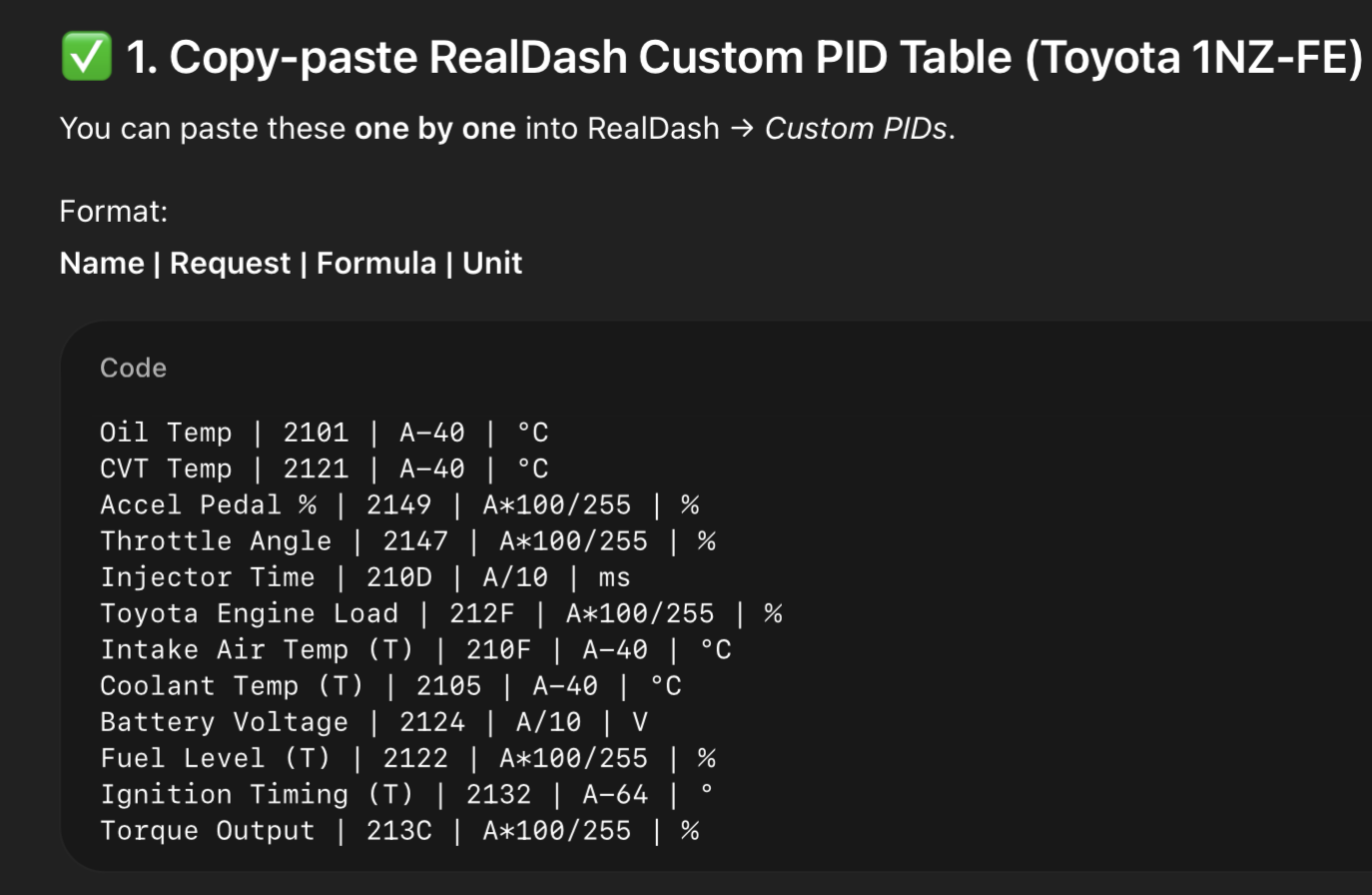
You can’t just trust the output of the ChatGPT, but lets try to verify if these custom PIDs are correct. Lets do it with only one PID for an example:
- With engine running, go to RealDash OBD2 Monitor in connection settings. Issue commands:
atsp0
0100
2101
Those commands will init automatic protocol, ask supported PIDs and then issue 2101 custom PID that should correspond to your engine oil temp. Analyse the reply for 2101 if one of the bytes - 40decimal would correspond to your actual oil temp.
- Once verified that vehicle is responding correctly to custom PID request, you can add the custom request into OBD2 XML file.
- Download RealDash-extras/OBD2/realdash_obd2.xml at master · janimm/RealDash-extras to your PC.
- Add this line to ‘rotation’ section of the XML:
<command send="2101" skipCount="20" targetId="152" units="C" conversion="V-40"></command> <!-- engine oil temp -->
- In RealDash connection settings, import your customized XML file for the connection. Go back to dashboard and then ‘Settings->Application->Debug->Debug Data View’ to verify that you are receiving the engine oil temperature from the vehicle.
If you are My RealDash subscriber, you can upload and edit the XML file in my.realdash.net, and then download the customized XML file directly from RealDash connection settings.
1 Like
Thanks a lot for the prompt response. Yes I am into my second year on my subscription. I always wanted to try to see if it supported any other parameters.
Well I also want to clarify another doubt which I have been having for quite sometime. Would one of the recommended OBD2 bluetooth scanners by RealDash output better results than a normal cheap OBD2. I use a normal OBD2 which runs alright but would it be the reason that it is not reading the other perceived parameters…Thanks once again for the wonderful job that you and your are doing.
Typically no. but there are some cheap adapters that do not implement some protocols fully, but with SAE-Standard PIDs they should all work the same. Better adapters, like OBDLink are generally more reliable and will work for years in cold/warn environments.
1 Like
Thanks. I was wondering how I could learn about “INPUT MAPPING” and how to SELECT TARGET INPUTS. I was excited to see so many options but not sure how these work and how to apply them to my vehicle. Are there any tutorials or videos that I can refer to. I feel like I can’t simply keep asking about each everything ,that could be a nuisance so self learning is better.
Thanks for your never ending support.
Way too many options, I agree. Unfortunately we do not have tutorial videos other than couple old ones that are related to designing dashboards.
I don’t mind you asking, but understand that there is so many things…
The idea of the input mapping is that you can just take a value from another input and pass it for another. Its sole purpose is to allow custom inputs to be mapped to ‘standard’ ones so our existing dashboards will show the information correctly even when using different inputs.
Input mapping also allows to use multiple sources for one information. Good example is ‘Vehicle Speed’. This can be changed from app Settings to come from various different sources. Internally the input mapping is used to pass speed value into ‘Vehicle Speed’ input so it shows on the dashboard without editing it.