Fellas,
Trying to read CAN data from a Haltech Elite 2500 ECU without success.
Downloaded and installed the driver for the dongle.
Set up Waveshare USB to CAN using Waveshare USBCAN V2.12 configurator with a Baud Rate initially with the default value: 2000000
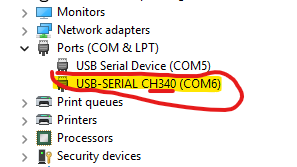
When I checked in the device manager, the dongle is recognized as shown in the picture below.
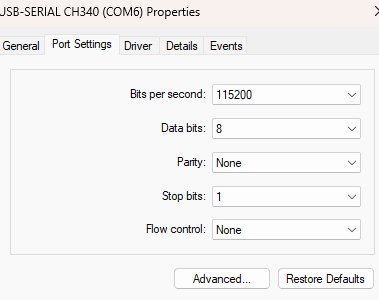
When I opened up the “Port Settings” tab noticed that the default Baud rate was set to 9600, tried to change to the dongle default 2000000 but the max it goes is 128000, so I did set up 115200 on the device manager as shown in the next image.
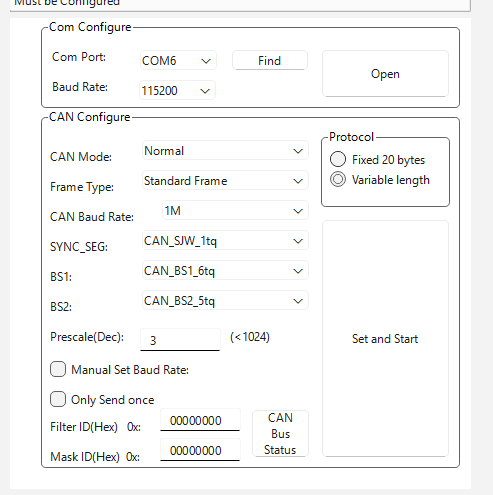
Went back to the dongle configurator and set it as shown on the image below. Just to match the device manager. Set up RD Baud rate to be 115200 as well. Note that Haltech CAN BUS speed is 1000KBS (1MPS), I configured the dongle CAN bus to match Haltech’s
Once I open RD, it appears to connect immediately, the connecting message appears just once and I can see the Rx light flashing very fast on the dongle, but when I go to the CAN monitor, it shows nothing.
Haltech is power up, and appears to be sending data, if I power down the Haltech, the Rx light on the dongle doesn’t flash anymore, suggesting that it is receiving some kind of data from Haltech when is ON
What I could be doing wrong? What I missed?